


Buoyweather - Marine Weather
2.285.00 Reviews
App Specs
- Version
- 1.7.1
- Updated On
- License
- Free
- Downloads
- 100,000+
- Developer
- Surfline/Wavetrak, Inc.
- Categories
- Weather
- Platform
- Android
Screenshots
 Analysis by AppCompare
I judge a marine forecast app by a practical question: does it help me make a better decision before I leave shore, without encouraging me to trust a screen more than the conditions around me? Buoyweather - Marine Weather is built for people who think in terms of a location on the water, not just a city’s daily high and chance of rain. That focus is useful, but it also calls for a cautious approach: a forecast is a planning aid, not a safety guarantee.
Trust starts with a narrow purpose
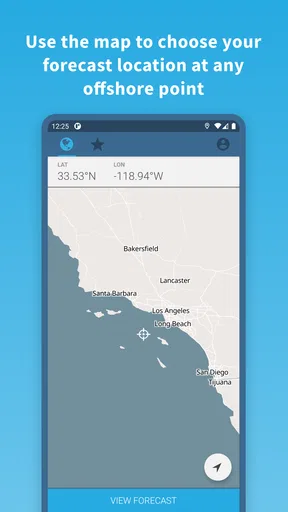
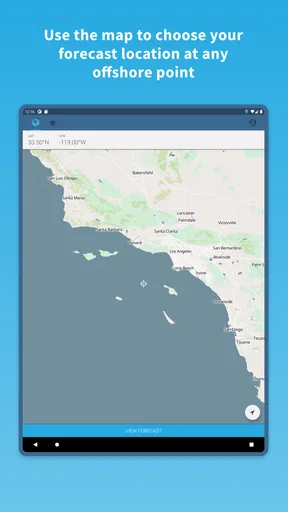
Buoyweather is a free weather app from Surfline/Wavetrak, Inc., aimed at marine conditions and point-based planning. That makes it a different tool from a general forecast app, which usually answers the question “What will the weather be like where I live?” A boater may instead want to compare conditions near a launch, a fishing area, or a route offshore. I find that distinction valuable because it encourages a more relevant question before a trip: what might the water and wind be doing at the place I plan to go?
The app has an average rating of 2.2 from 406 ratings, alongside 85 written reviews, so I would not treat its popularity as proof of a uniformly smooth experience. It has over 100,000 installs, but that does not tell me whether its forecasts will fit a particular coast, activity, or day. I’d use it as one source of context and check conditions again before departure, especially when plans depend on a narrow weather window.
What I can judge, and what I keep separate
Weather apps can involve location choices and other data decisions, so I prefer to distinguish visible use from assumptions. I can say that Buoyweather’s purpose is marine forecasting and that its interface is presented as a way to find forecasts for chosen points. I would not infer privacy practices, precise permission requests, or account controls from that purpose alone. Anyone who is careful about location sharing should review the choices shown on their own device and in the app before deciding how to use it.
That distinction matters at sea. A forecast for a selected point can be useful without making it necessary to share more location information than you are comfortable with. I’d consider whether manually choosing a place meets my planning needs, then make any location-related choice deliberately rather than tapping through automatically. If I’m checking conditions at home before a trip, I can think through the forecast without treating continuous access to my location as a requirement.
Useful choices before a trip
I also recommend deciding what you need from a marine forecast before opening the app. If the question is whether wind or waves could make a short outing uncomfortable, focus on those conditions and compare the relevant points. If the plan is more demanding, use the app as one part of a broader check rather than letting one forecast settle the decision. A second source and an on-the-day look at local conditions can help reveal when forecasts differ or when the situation has changed.
Buoyweather is free to download, but in-app purchases range from $14.99 to $79.99 per item. I’d check the purchase details shown in the app before paying and decide whether the features offered address a real need in my routine. The app is rated for Everyone, was released on April 15, 2016, and its current version is 1.7.1, with Android 7.0 as the minimum operating system. Those details help set expectations about compatibility and cost, but they do not replace trying the basic experience on your own device.
Worth Reading Before You Choose

EA SPORTS FC Mobile 26 Is a Bigger Football Game, but It Takes Time

Flipboard Shows What News Apps Must Do Beyond the Feed

Switching to Android Auto Means Rethinking Your Driving Routine

Google Calendar Makes a Crowded Week Easier to Manage

Ludo King Makes the Most of the Minutes Between Plans

Baby Panda World Brings Quick Play to Modern Phones, but Its Game Library Feels Busy
Easy Navigation and User-Friendly Interface
First off, let's talk about the user interface. One of the first things you’ll notice is how intuitive it is. You don't have to be a tech wizard to figure out how to use Buoyweather. From the moment you open the app, the clean design and straightforward navigation make it super easy to find the information you're looking for. Whether you're a seasoned sailor or someone just starting out, you'll appreciate how everything is laid out.
Detailed Weather Forecasts
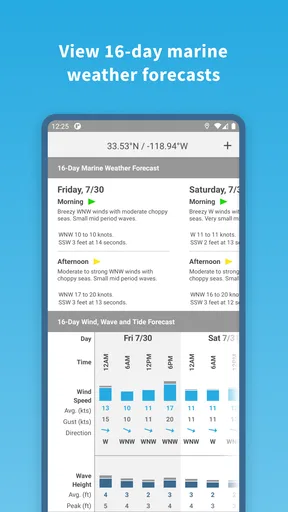
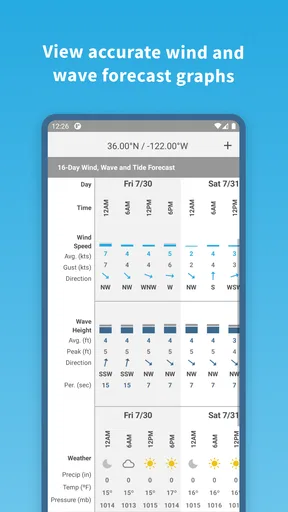
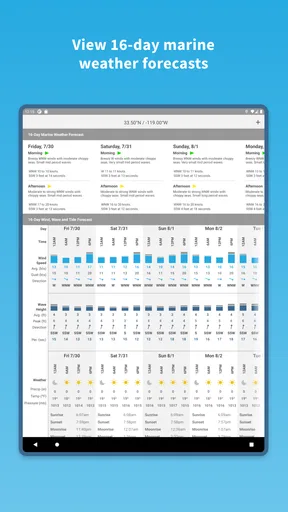
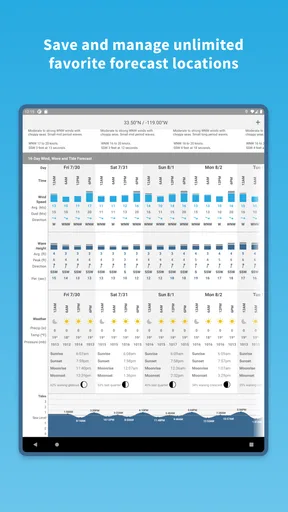
What really sets Buoyweather apart is its detailed weather forecasts. This isn't your average "partly cloudy with a chance of rain" kind of app. We're talking about comprehensive marine forecasts that include wind speed, wave height, and even swell direction. It's like having your personal weather station right in your pocket. Whether you're planning a fishing trip or a day out on the sailboat, this app has got you covered.
For me, the practical advantage of point-based forecasting is that I can think beyond the nearest town’s weather. Conditions on the water may not match what a land-focused forecast suggests, so I’d check the point closest to the actual activity rather than relying on a forecast for the marina or home address. If a route crosses different stretches of water, comparing more than one relevant point is a sensible habit; a single location cannot stand in for every part of a journey.
Customizable Alerts
One of my favorite features is the customizable alerts. You can set up notifications for specific weather conditions, so you’re never caught off guard. Imagine getting a ping when the wind speed reaches a certain threshold or when the waves get a bit too choppy. It's like having a trusty lookout who’s always got your back.
I’d use alerts as reminders to recheck conditions, not as permission to stop paying attention. A notification can be helpful when I’m getting ready at home or handling other trip preparations, but it cannot tell me how the water looks at the launch or whether local circumstances have shifted. A useful routine is to set thresholds that matter to the outing, then check the forecast directly before committing. Very broad or overly sensitive alerts can become noise, while thresholds chosen for a specific plan are easier to act on.
Global Coverage
Another aspect that impressed me is the global coverage. Whether you're cruising around the Caribbean or navigating the fjords of Norway, Buoyweather has you covered. The extensive range of buoys and weather stations ensures you're getting accurate and up-to-date information no matter where you are in the world.
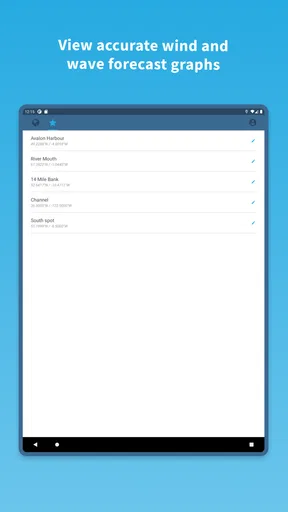
For a familiar coastal area, I’d use the app to compare a point near the harbor with one closer to the intended fishing or sailing area. That comparison can be more informative than staring at a single number because it prompts me to consider how the plan changes as I move away from shore. For a new destination, I’d first check that the points offered make sense for the waters I intend to visit; coverage claims should not replace local knowledge or a check that the chosen location is representative.
Subscription Plans
Now, let's talk about the subscription plans. The app offers both free and premium versions. The free version is pretty solid, giving you access to basic forecasts. But if you're serious about your marine activities, the premium version is worth considering. It offers more detailed forecasts and additional features that can make a big difference in planning your trips.
Because the available purchases can add up, I would not upgrade just because a trip is coming up. I’d first use the free experience to see whether the forecasts answer my ordinary planning questions, then compare the purchase screen with the features I would actually use. A frequent sailor may value extra detail more than someone who goes out occasionally; for a casual beach or harbor visit, a standard local forecast may be enough. If the paid options do not solve a specific problem in my workflow, keeping the free app—or choosing another source—is the more sensible choice.
Choosing it over a general forecast
Compared with the usual weather app, Buoyweather’s appeal is its marine focus and the ability to think in terms of selected water locations. A general app is often quicker for checking rain, temperature, or the forecast near home, and it may be all I need for a walk along the waterfront. For boating, fishing, or sailing, however, the marine variables and point-based view give me a more relevant starting point. I would not expect either type of app to answer every question: the best choice depends on whether I need everyday land weather or conditions that matter to a specific stretch of water.
There is also a useful trade-off between detail and simplicity. More marine information can help me plan, but it can also tempt me to treat a forecast as more precise than the situation warrants. If several points show a changing picture, I’d use that as a reason to reconsider timing or route, not to calculate that a trip is automatically safe. For someone who rarely leaves shore, the extra focus may feel unnecessary; for someone making repeated trips, it can make checking conditions feel more purposeful.
A realistic planning routine
Imagine I’m planning a weekend fishing trip and need to decide whether to leave early or wait. I’d check the point nearest the fishing area, look at the wind, wave height, and swell direction, and compare it with a point nearer the launch if the two locations differ. I’d set an alert around a condition that would change my plan, then check again before leaving. If the forecast and what I observe locally disagree, I would trust the caution in that mismatch and reconsider the outing rather than assume the app has the final word.
That workflow is more useful than opening the app once and treating the first screen as a complete trip briefing. It separates planning from the final go-or-no-go decision, and it gives me a reason to check whether an alert is actionable. For a short, familiar outing, one or two relevant points may be enough to orient my decision. For a longer route, I’d want to consider how conditions may vary along the way and consult other dependable sources as well.
Who will get the most from it
I’d recommend trying Buoyweather if marine conditions are a regular part of your plans and you want a forecast organized around locations on the water. Sailors and anglers are natural fits, as are boaters who already check wind and waves before choosing when to go. The app may also help a beginner learn which marine conditions to pay attention to, provided they treat the forecast as guidance and seek local advice when they are unsure.
I’d be less likely to recommend it as someone’s only weather app if most of their needs are ordinary city forecasts, or if they want a complete navigation and safety system in one place. It is also not the right choice for anyone who expects an app notification to replace judgment, changing observations, or preparation. A person who is uncomfortable with the data choices visible on their device should review those choices first and use the app only in a way that feels acceptable to them.
Real-World Application
I recently used the app on a weekend sailing trip, and it was a game-changer. The forecasts were spot-on, and the alerts helped us avoid a squall that could have dampened our day. It's one of those tools that, once you start using it, you wonder how you ever managed without it.
So, if you're on the lookout for a reliable marine weather app, give Buoyweather a try. It's a handy, reliable, and well-designed app that delivers exactly what it promises, making it a must-have for anyone venturing out to sea.
Happy sailing!
Pros
- Accurate forecasts tailored for marine activities.
- Intuitive interface with easy navigation.
- Customizable alerts for changing weather conditions.
- Detailed data on tides and currents.
- Global coverage with localized forecasts.
Cons
- Limited free features; premium needed for full access.
- Occasional loading delays in remote areas.
- Requires stable internet for real-time updates.
- No offline mode for downloaded data.
- Ads present in free version.
FAQs for Buoyweather - Marine Weather
What features does Buoyweather offer for marine weather forecasts?
Buoyweather provides accurate marine weather forecasts, including wind speed, wave height, and tide information. Users can access 2-day forecasts for free, with a paid subscription offering 7-day forecasts. The app is designed for sailors, fishermen, and marine enthusiasts needing reliable weather data.
Is Buoyweather available for both Android and iOS devices?
Yes, Buoyweather is available on both Android and iOS platforms. Users can download the app from the Google Play Store for Android devices and the App Store for iOS devices. This ensures broad accessibility for marine weather enthusiasts regardless of their preferred mobile operating system.
How accurate are the weather forecasts provided by Buoyweather?
Buoyweather is known for its high accuracy in marine forecasts, drawing data from reliable sources and using advanced modeling techniques. The app is trusted by professionals and hobbyists alike for its precise information on wind, waves, and tides, helping users make informed decisions while on the water.
Does Buoyweather offer offline access to forecasts?
Buoyweather allows users to download forecasts for offline use, which is ideal for areas with limited internet connectivity. This feature ensures that users have access to critical weather information even when out at sea, providing added safety and convenience during marine activities.
What are the subscription options for Buoyweather, and are there any free features?
Buoyweather offers a free version with access to 2-day forecasts. For more extensive features, users can opt for a premium subscription, which provides 7-day forecasts, enhanced data, and additional tools. The app caters to different needs, allowing users to choose the option that best suits their requirements.


